

This article was written by Contributing Writer Erik van Mechelen with input from Jun Loayza and Yu-kai Chou.
⚠️ Editor’s Note (2026): Pivotal Tracker shut down on April 30, 2025. This analysis preserves the original Octalysis breakdown as a case study in how product design choices shape user behavior — and why broad use-case appeal (Trello’s strength) outlasts narrow specialization when platforms lose support.
Table of Contents
Author Credibility: Yu-kai Chou

Yu-kai Chou created the Octalysis Framework after studying gamification since 2003 — years before the term entered mainstream vocabulary. As a Human-Systems Architect & Behavioral Designer, his framework has been applied by LEGO, Microsoft, Porsche, Coca-Cola, Salesforce, and MrBeast, impacting over 1.5 Billion Users.
Chou has taught the Octalysis methodology at Harvard, Stanford, Yale, Tesla, Google, BCG, and IDEO.
His work has been cited by Harvard, Stanford, MIT, Forbes, Wall Street Journal, Wired, US Department of Energy, NIST, NSF, NCBI, US Department of Education, ClinicalTrials.gov, and Google Scholar — with 3,700+ more academic publications. Explore his books here.

A Wide versus Narrow Lens
Talk to anyone you know who uses a non-phone camera. She’ll likely talk about what she’s trying to accomplish first, then explain the type of camera, the lens, and other features helping her accomplish the goal.
The camera metaphor was useful in examining my own use of Trello and Pivotal Tracker.
Pivotal Tracker could be used for anything — I used it to track progress on my novel writing — but Trello is better for a wider set of use cases and now has over 50 million users worldwide.
In this post, we’ll discover why I chose Pivotal Tracker over Trello to push myself to novel completion — and what the Octalysis Framework reveals about why one tool survived and the other didn’t.
As always, I’ll use the Core Drives of Octalysis throughout the analysis. Both Trello and Pivotal Tracker do well in Core Drive 2: Development & Accomplishment and Core Drive 3: Empowerment of Creativity & Feedback.
Trello: Productivity, Collaboration, Communication
I’ll take Trello and Pivotal Tracker one by one, then compare.
Trello feels light and fun and has a wolf mascot named Taco. This makes it approachable during Onboarding.
Through Scaffolding and Endgame, Trello gives individuals and teams a sense of progress and achievement (Core Drive 2: Development & Accomplishment) and the flexibility and customization leading to long-term productivity (Core Drive 3: Empowerment of Creativity & Feedback).
I’ve used Trello to break down movies like Moneyball and dissect interesting novel plots like Cloud Atlas’s.
Here’s my first shot at the Octalysis tool for Trello:
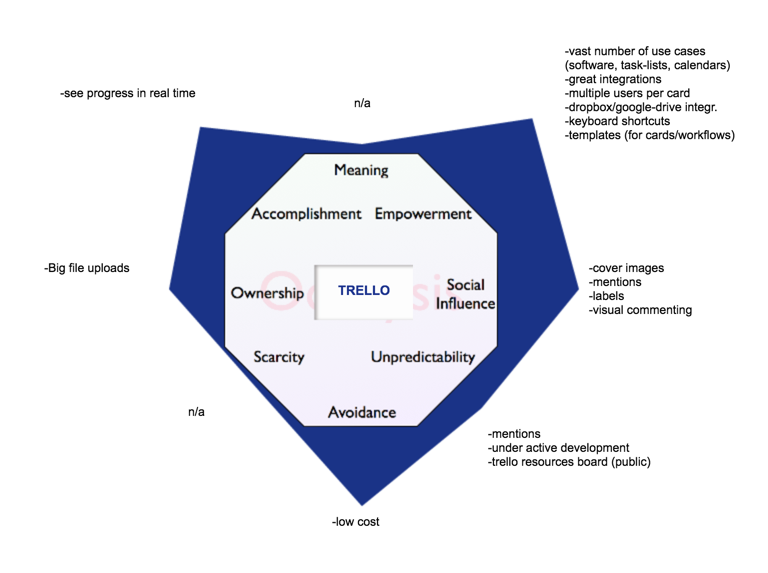
The adjustments I’d add are these:
(Trello) Core Drive 2: Development & Accomplishment
Cards are effective productivity engines. They enable collaboration toward goals in workflows.
Trello has consistently improved these one-view snapshots of a particular task/story/project.
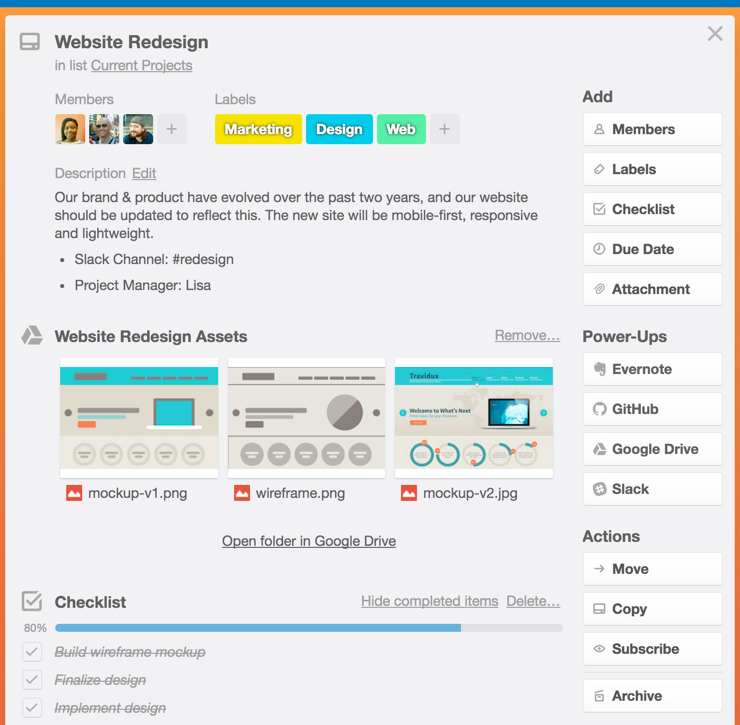
Notice the checklist feature and associated progress bar. By subscribing, a team member can attain updates from this specific Card.
If we draw back to a view of columns of Cards, we see titled columns, custom labels, Card membership, and deadlines.
At a glance, a manager or team member involved in multiple pieces of a project or company can see it all.
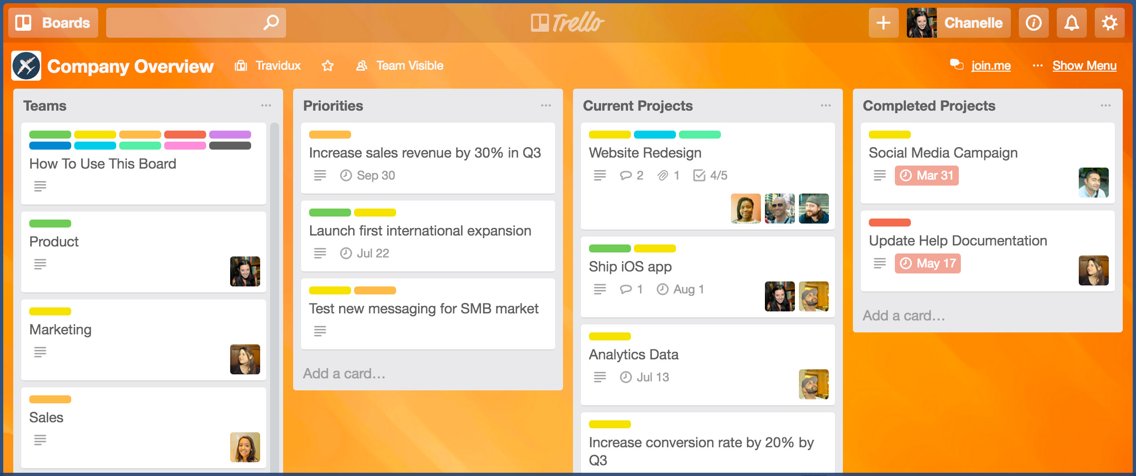
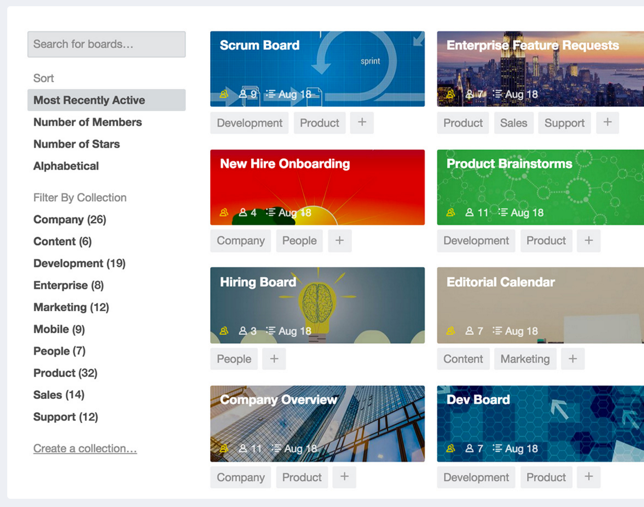
At one step higher, we see Collections and filters, each of which reward a user for logically curating his work and team and projects.
Organizing this view with collections and custom labels makes the user feel smart, a reward which repays itself because of the efficiency gains achieved.
(Trello) Core Drive 3: Empowerment of Creativity & Feedback
Trello enables the freedom to design workflows for many scenarios.
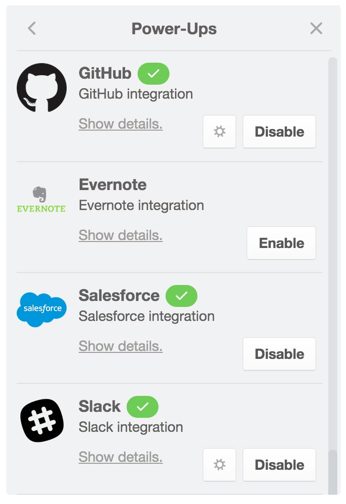
Design-wise, Trello offers Power-Ups (integrations) to wherever an individual or company is likely to actually do some of their work.
Again, notice how Trello allows for teams, say, with technical and non-technical teams to exist in the same ecosystem (the software teams can work in GitHub while the sales team may live in Salesforce).
Power-Ups is a great name for integrations. It feels slightly better “powering up” versus “integrating.” The word power-up is associated for any gamer with leveling up.
Once your team levels up, it also gains the Milestone Unlock (the ability to do better things once unlocking something new).
Templates are another useful way to double-down on successful Cards or Workflows.
You can even clone entire boards, or copy just lists. You can get as granular as copying “checklists” within cards.
Pivotal Tracker: Standard in Agile Software Development
Note: Pivotal Tracker shut down in April 2025. This section preserves the original analysis as a gamification case study.
Pivotal Tracker was built for agile development and wasn’t shy about it. To an extent it grew to something of an industry standard, though it far from monopolized this space.
Here’s my first go at the Octalysis tool for Pivotal Tracker.
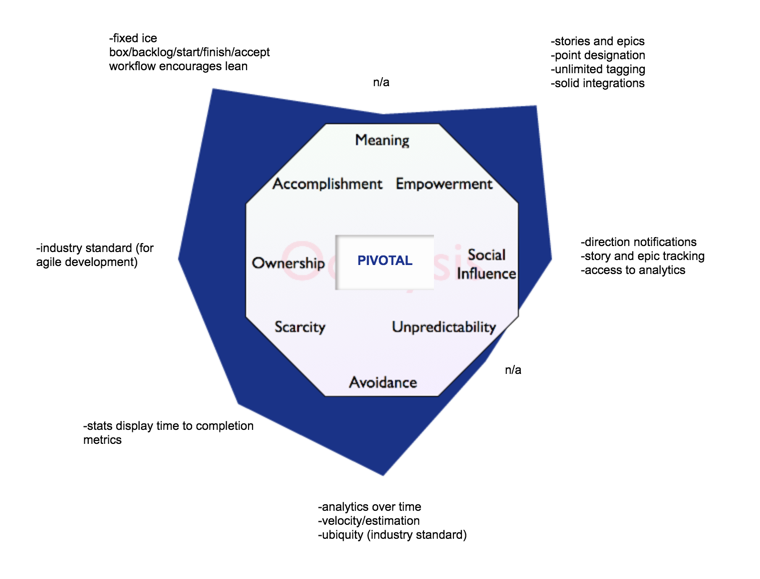
The adjustments I’d add are these:
- Analytics for story/epic velocity (CD2) — the user or manager sees progress over time
- Removal of choice (early wins) (CD2) — the opening (Onboarding) state is fixed, so users are encouraged to begin their first project
(Pivotal Tracker) Core Drive 2: Development & Accomplishment
Pivotal Tracker was most often used for agile software development. But I used it for tracking my novel writing progress.
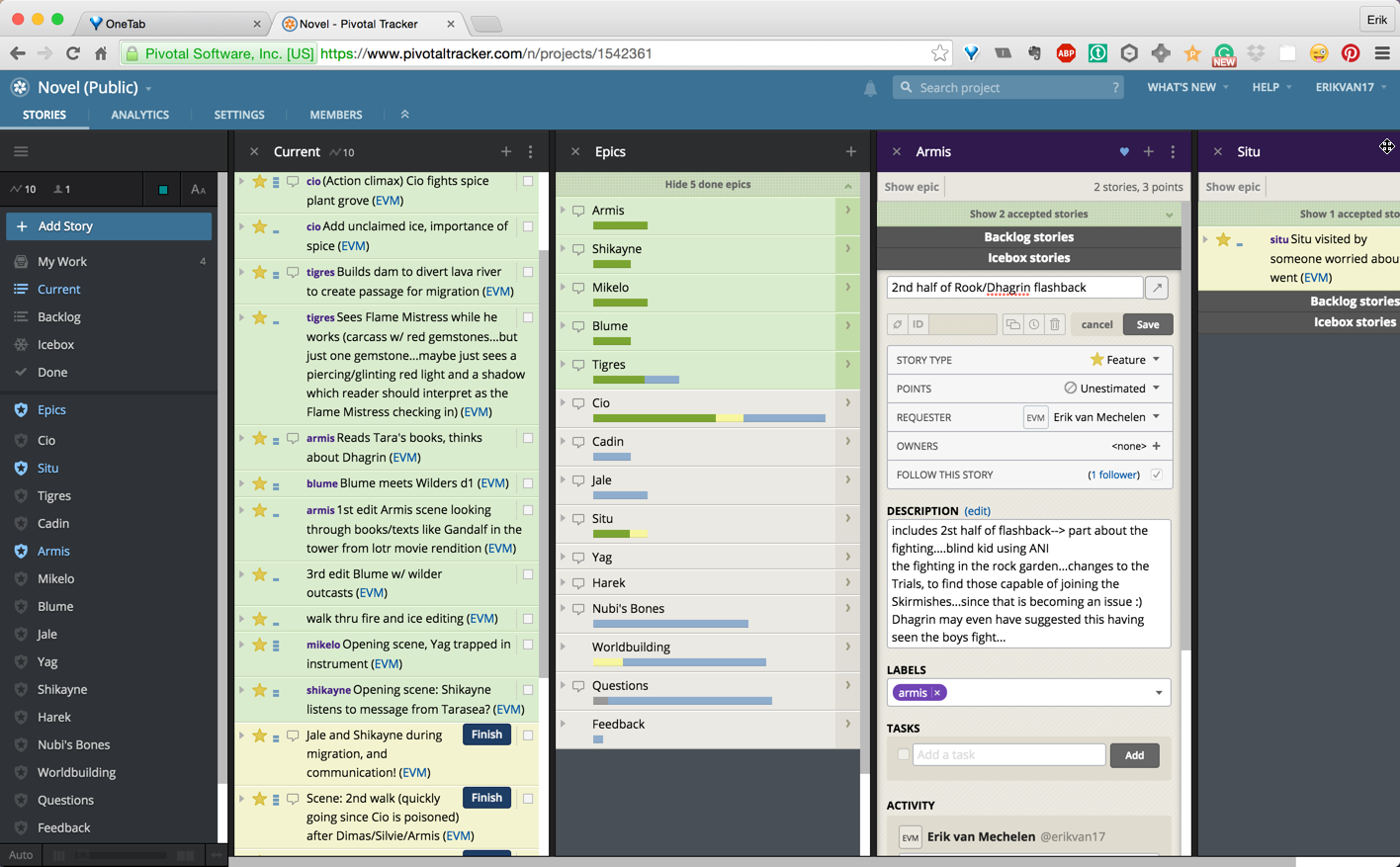
I liked assigning points (effort) to stories arranged in Epics. Every story (or chore or bug) was organized or prioritized in the Icebox, Backlog, or Current work.
Here I am opening a new story/task (see image below). In the third column (an epic named “Armis”), I’m creating a story/task about a flashback scene.
As of this screenshot, I hadn’t estimated the Points/effort for the task, but I had started to provide a description of the task:
If we step back, I can see what I’m currently working on, in yellow highlight:
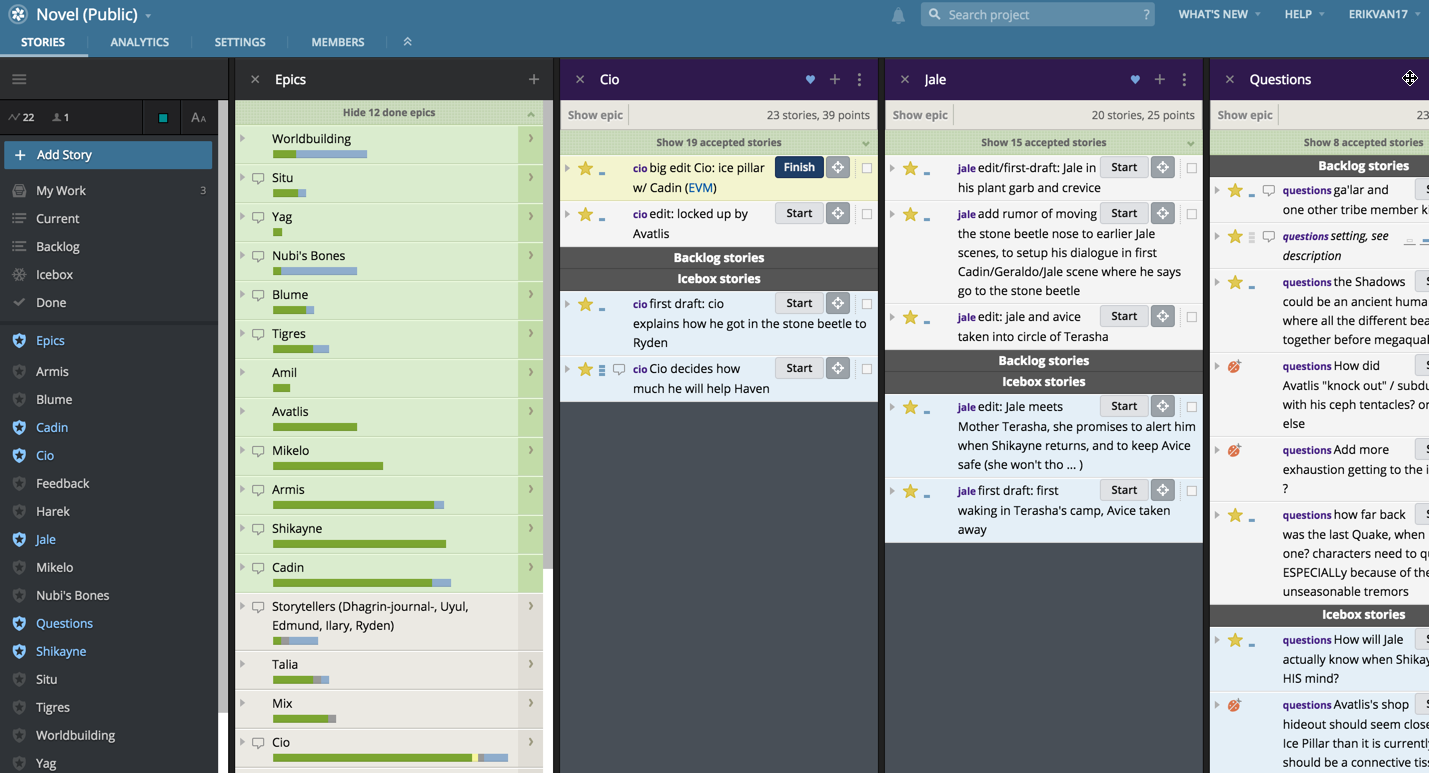
And stepping back further, I can review progress over time:
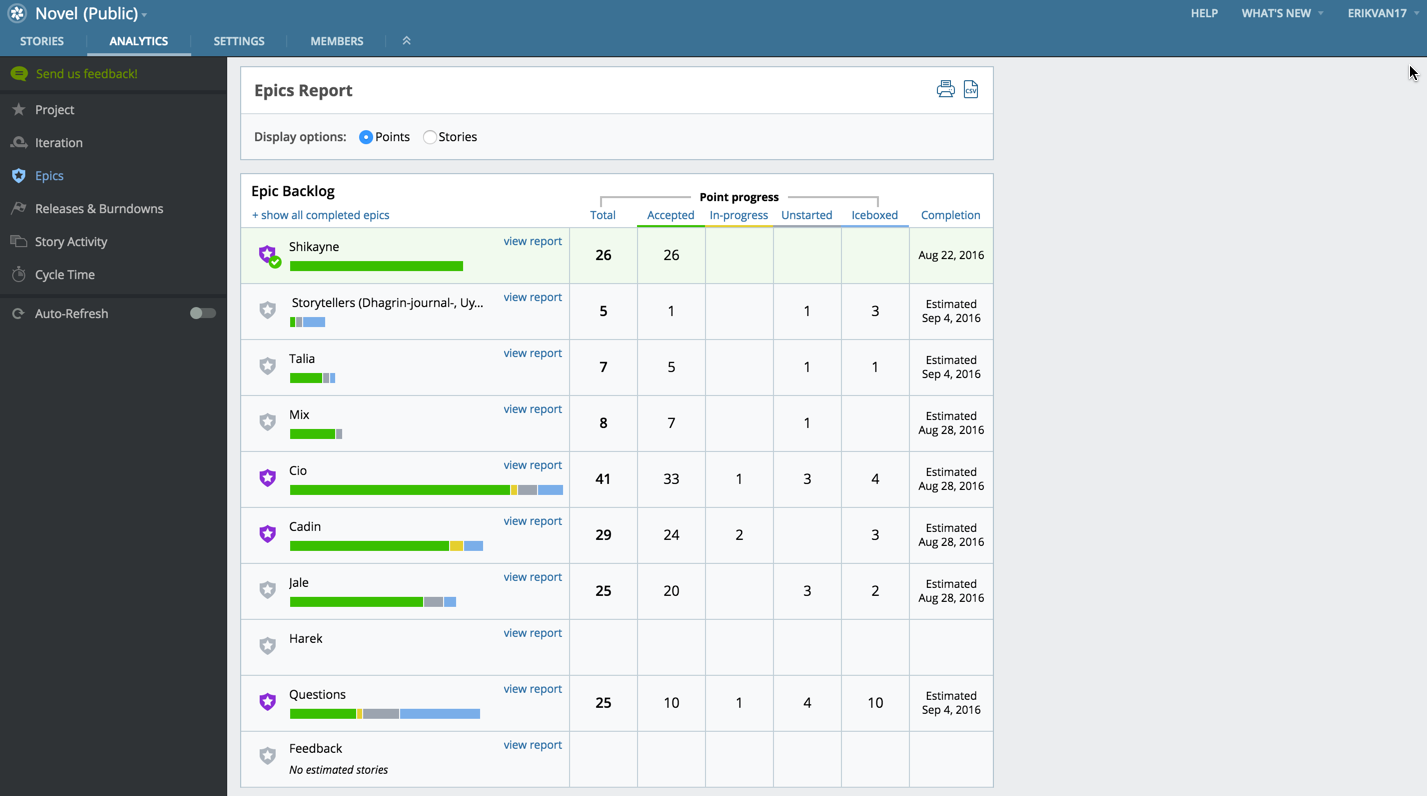
(Pivotal Tracker) Core Drive 3: Empowerment of Creativity & Feedback
Pivotal Tracker didn’t allow for too much grand scale creativity, but it functionally provided a place for individual and team project development and completion with a specific focus on agile software development.
It did, however, give feedback through progress analytics:
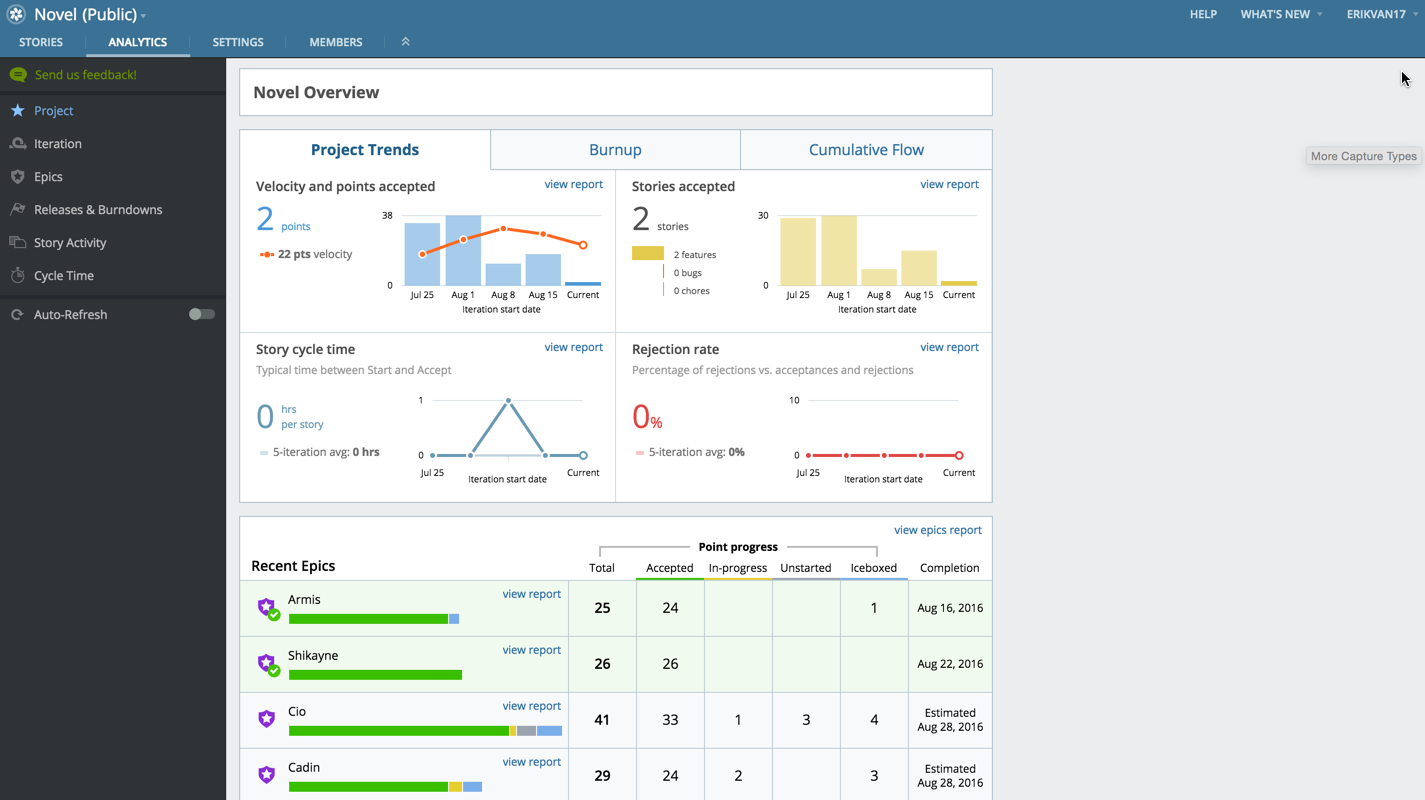
Since I spent about half my time writing and half reading, a 22-point velocity (every point requiring between 1 and 1.5 hours of attention/effort), I was satisfied with my writing/editing output and trend in the last four weeks, kicked off by some writing-heavy weeks to end July and start August.
Wide or Narrow Lens?
Why did I choose Pivotal Tracker to track my novel?
I think it came down to this: I knew I wanted to complete my novel, and I simply needed an easy way to do that with a calibration for effort and prioritization (I can show my analytics to a friend who can see which parts of the book I’m working on).
Keen readers and makers and developers might object that estimation is inherently tricky and even counter-productive, but the ability to set point/effort on my work helps understand what I want to accomplish in a three- or four-hour writing session.
Of course, if something takes longer, I can alter the effort input after the fact.
Trello, though, seems to offer a better Endgame for more use cases. Here’s just a few I’ve made:
Moneyball scene by scene:

While watching Moneyball, I used the Trello iPhone app to create the scene-by-scene analysis with comments. I reviewed again after completing the film, adding comments where needed.
Cloud Atlas analysis:
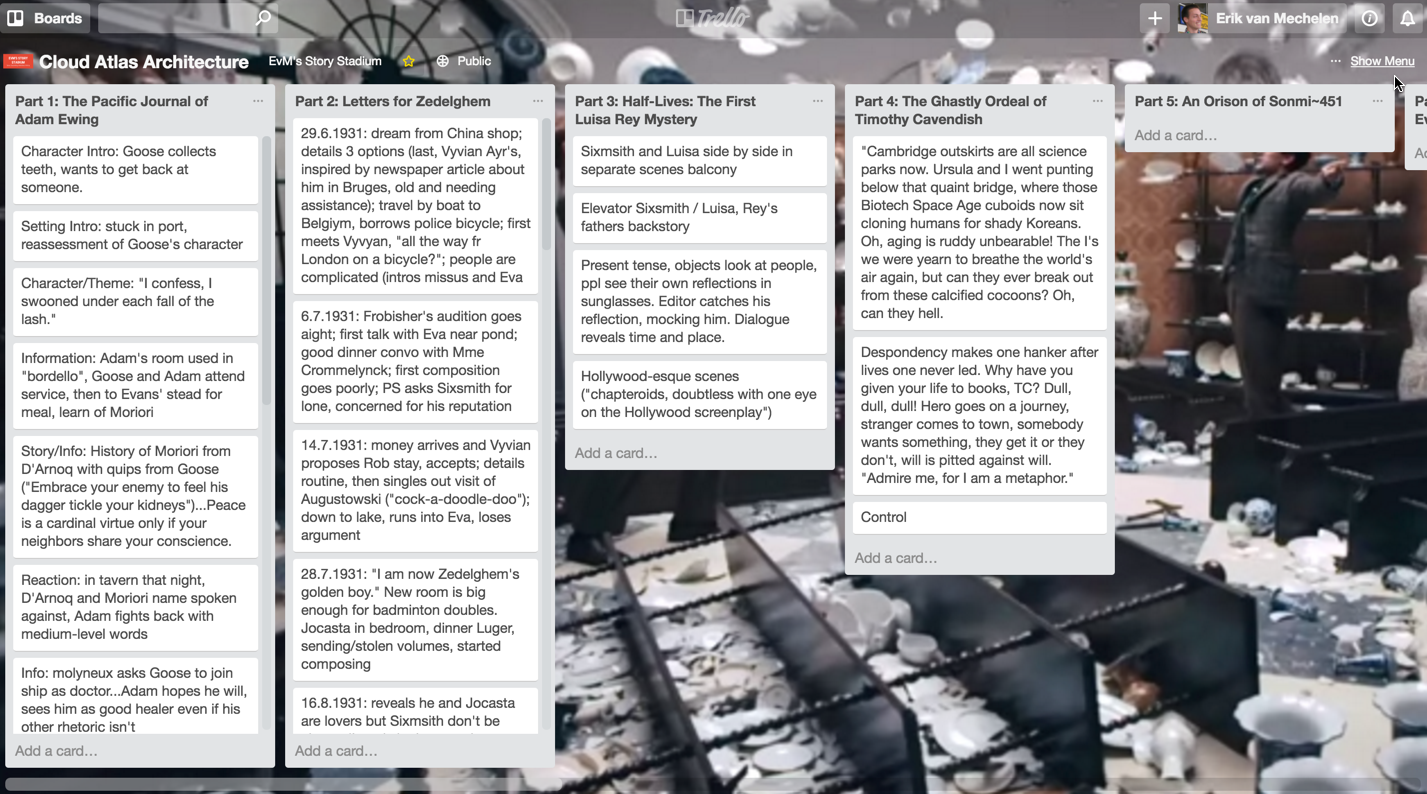
Cloud Atlas is a novel with an intricate structure. I used Trello to keep notes and plan for a podcast on the novel’s structure.
And more:
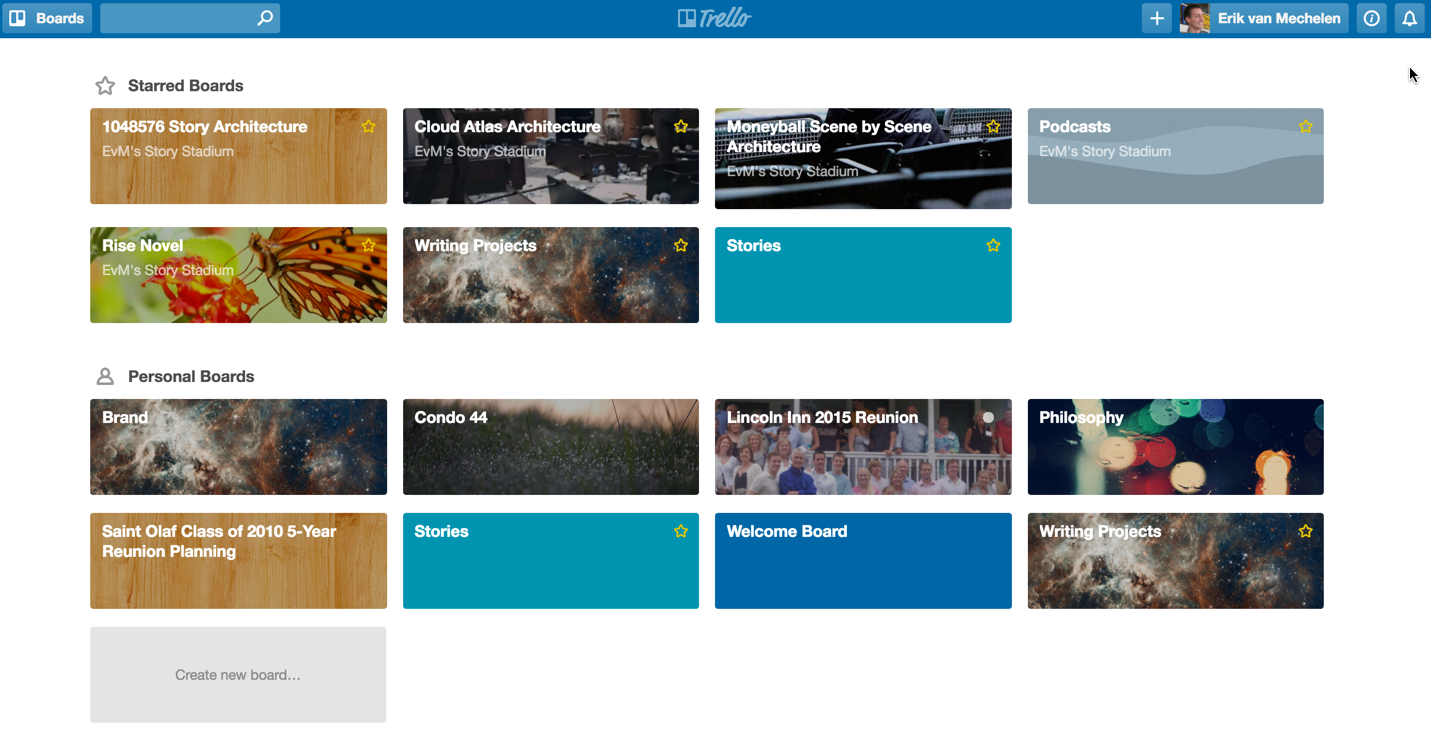
I’ve used Trello for reunions, story ideas, podcasts, and reading lists.
What Pivotal Tracker’s Shutdown Teaches Us About Product Design
Pivotal Tracker shut down on April 30, 2025, after Broadcom’s acquisition of VMware Tanzu led to its discontinuation. Meanwhile, Trello — acquired by Atlassian in 2017 — grew to over 50 million users.
Through the lens of the Octalysis Framework, this outcome isn’t surprising. Trello’s strength in Core Drive 3 (Empowerment of Creativity & Feedback) — its open-ended board system adaptable to any workflow — gave it resilience that Pivotal Tracker’s narrow agile focus couldn’t match.
Products that lean heavily on Core Drive 2 (Development & Accomplishment) through rigid structure attract dedicated users, but they struggle to expand beyond their niche. Products that balance CD2 with CD3 — structured enough to feel productive, flexible enough to feel personal — tend to survive market shifts.
This is a White Hat gamification lesson: tools that empower users to create their own systems build stronger long-term engagement than tools that impose a single “right way” to work.
Related Reading
- The Octalysis Framework for Gamification & Behavioral Design
- Core Drive 2: Development & Accomplishment
- Core Drive 3: Empowerment of Creativity & Feedback
- White Hat vs Black Hat Gamification
- What is Gamification?
- Points, Badges, and Leaderboards: The Gamification Fallacy
- Core Drive 4: Ownership & Possession
- How to Design Effective Leaderboards
- Books by Yu-kai Chou